Bring 20 years of SAT & SSAT teaching into your academy

For two decades, Ivy Academy has taught students and analyzed the questions SAT and SSAT repeatedly ask. IPE turns the Rules and patterns behind years of substantial score gains into one program your teachers can deliver consistently.

A tested method. Your teachers. Your students. IPE is the program system.

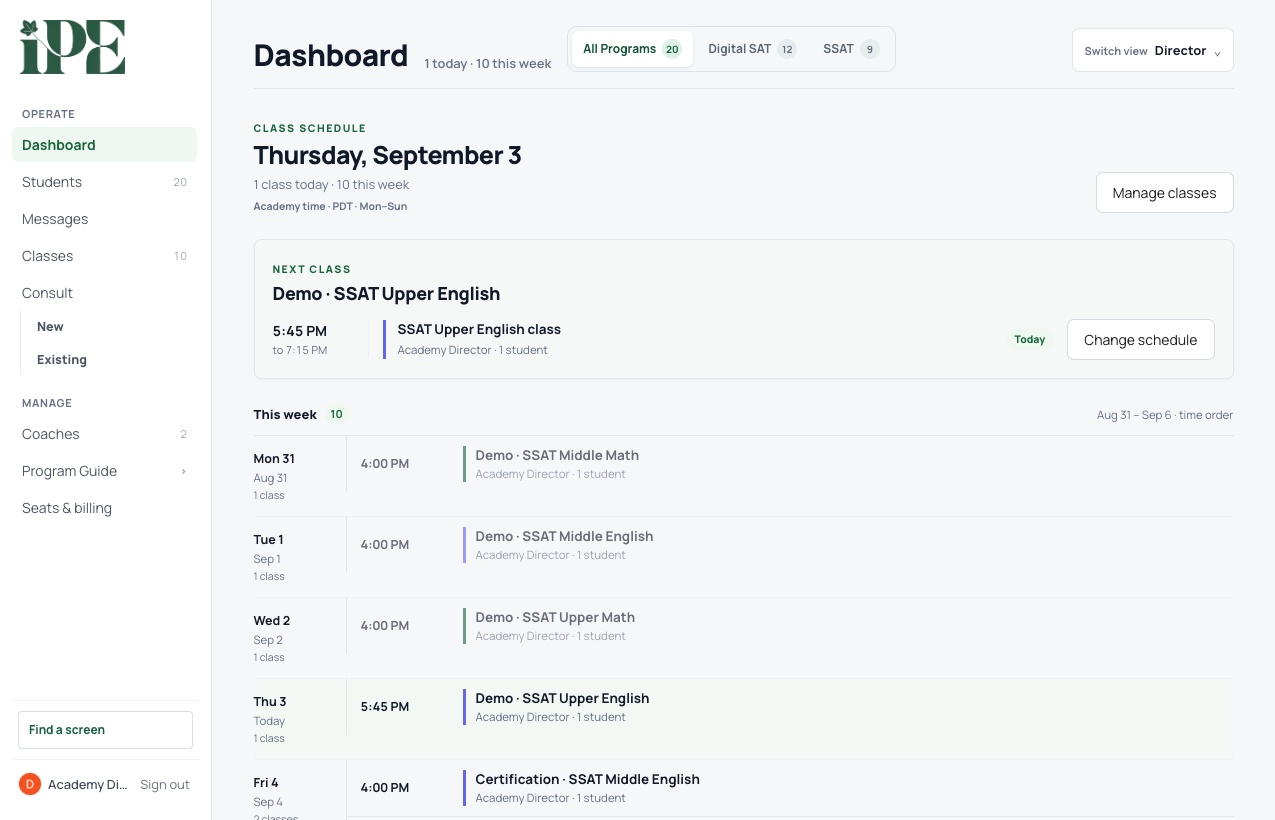
CURRENT DIRECTOR CONSOLE · DEMO DATAWEEKLY OPERATIONS
Current IPE director dashboard showing weekly classes, active assignments, and student follow-up using demo records
The week starts with classes and work that need attentionSchedules, assignments, and follow-up remain visible in one operating view
20 yearsteaching students and analyzing SAT & SSAT questions
Rules + patternsthe recurring decisions students can learn and reuse
Years of gainssubstantial score improvement in our own classrooms

Teach the pattern. Name the Rule. Reuse it until it becomes automatic.

We identify what the tests ask again and again, turn that pattern into a short decision, and teach the same Rule through lessons, practice, timed work, tests, and answer review. Students do not start from zero on every question.

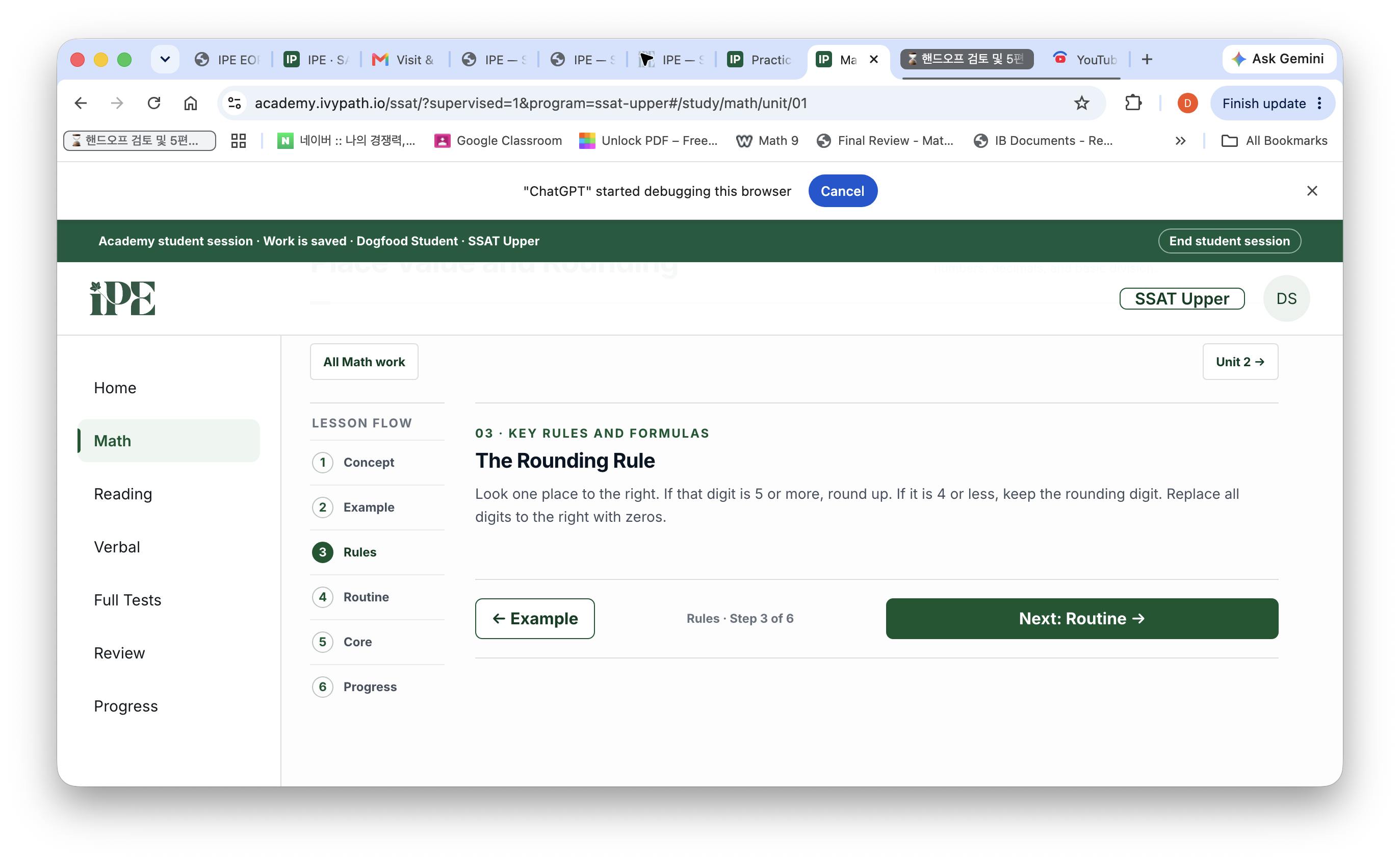
The Rounding Rule Look one place to the right. If that digit is 5 or more, round up. If it is 4 or less, keep the rounding digit. Replace all digits to the right with zeros.
CURRENT SSAT UPPER MATHCONCEPT → EXAMPLE → RULE
Current IPE SSAT Upper Math lesson displaying the Rounding Rule and lesson sequence
The Rule appears inside the lessonThe same decision returns in practice, tests, and review

Three problems that keep an academy from building a durable test-prep program

The program must survive staff changes, give families a clear account of progress, and grow without rebuilding the curriculum for every class.

Hard to staff

When the method lives with one experienced teacher, the program leaves when that teacher leaves.

IPE keeps the teaching method in the books and the app, so another trained teacher can follow the same lesson language.

Hard to explain

A test score alone does not tell a parent what the student learned or what the academy will teach next.

Assignments, missed questions, Review, and progress remain connected to the lesson and Rule being taught.

Hard to scale

Writing SAT and SSAT curriculum, tests, explanations, and reports from scratch takes years.

IPE supplies the connected program while your academy keeps the teaching and family relationship.

What a partner academy gets

A connected instructional package, not a folder of questions. The same program language runs from the teacher’s lesson to the student’s work and the family’s update.
Student and family accessStudent learning, homework, timed practice, tests, Review, Progress, and a separate parent portal
Teacher and director toolsClasses, students, assignments, consultations, messages, progress records, and supervised student views
Nine printed booksDigital SAT Reading & Writing and Math, plus SSAT Vocabulary, Verbal, Reading, and Math materials
Teacher onboardingProgram sequence, named Rules, class workflow, and the connection between teaching and digital work
Testing and reportingPlacement, timed practice, Mock and Full Tests, answer review, and program-specific progress reporting
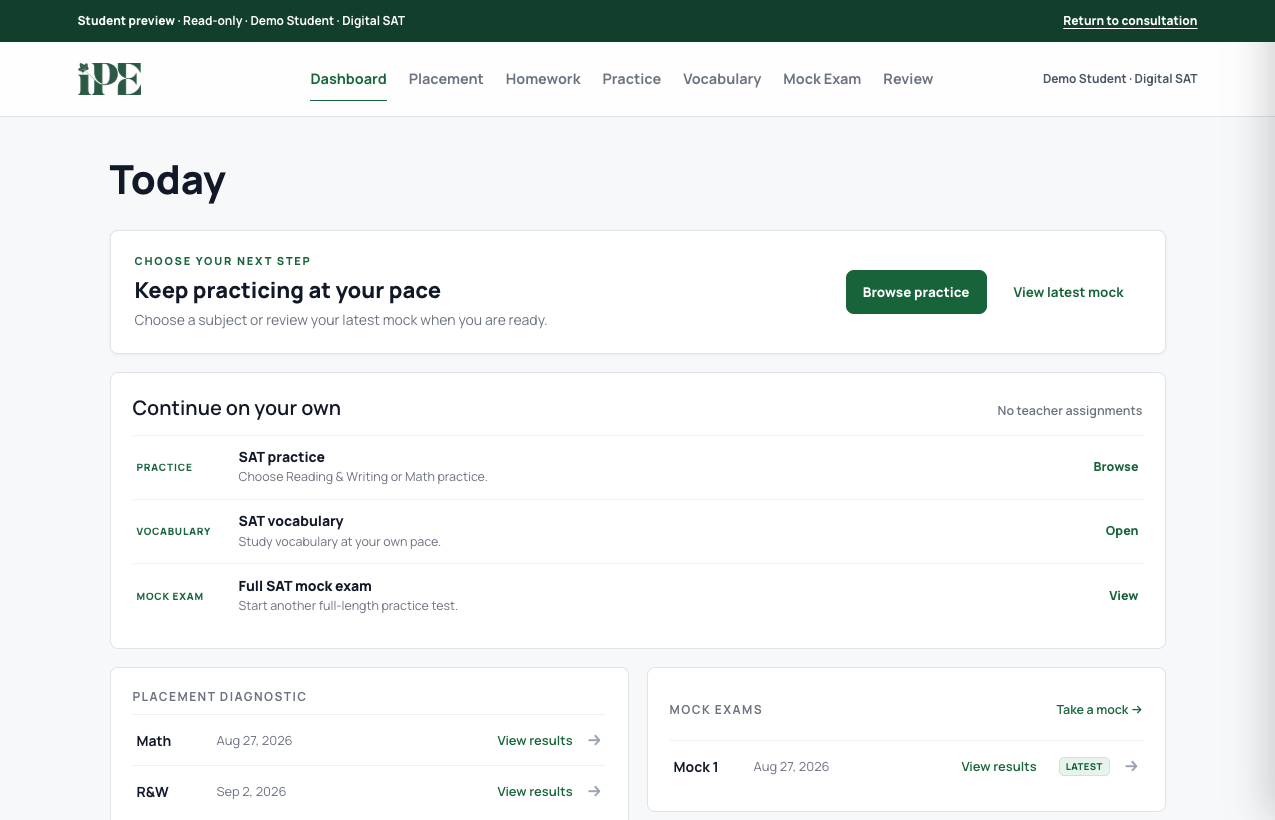
CURRENT STUDENT VIEW · DEMO DATADIGITAL SAT
Current IPE Digital SAT student dashboard showing completed placement, a completed mock test, and the next recommended work for a demo student
Students see what to do next and what they completedPlacement, practice, Mock, and Review remain connected in the current dashboard
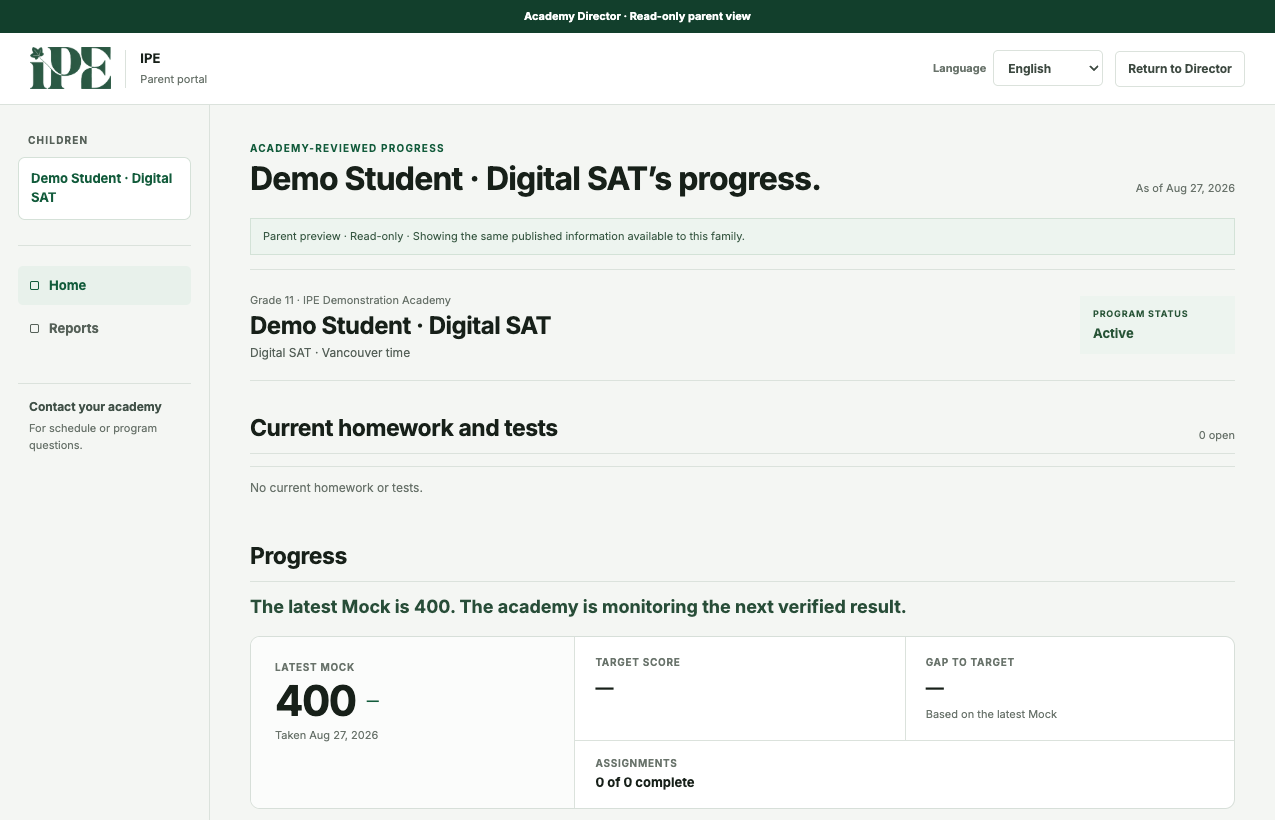
CURRENT PARENT VIEW · DEMO DATAACADEMY-REVIEWED PROGRESS
Current IPE parent progress page showing a completed mock result, recent accuracy, and an academy-reviewed progress update for a demo student
Families see progress the academy has reviewedResults, current accuracy, and the next-class plan use the same student record

What the director can follow

The academy remains the operating center. Directors and instructors use role-appropriate views of the same students, classes, assignments, and progress records.
Class operationsSchedules, rosters, teacher access, and assigned work
Student progressProgram status, subject progress, tests, and work requiring attention
Family communicationConsultation views, messages, and academy-published progress updates
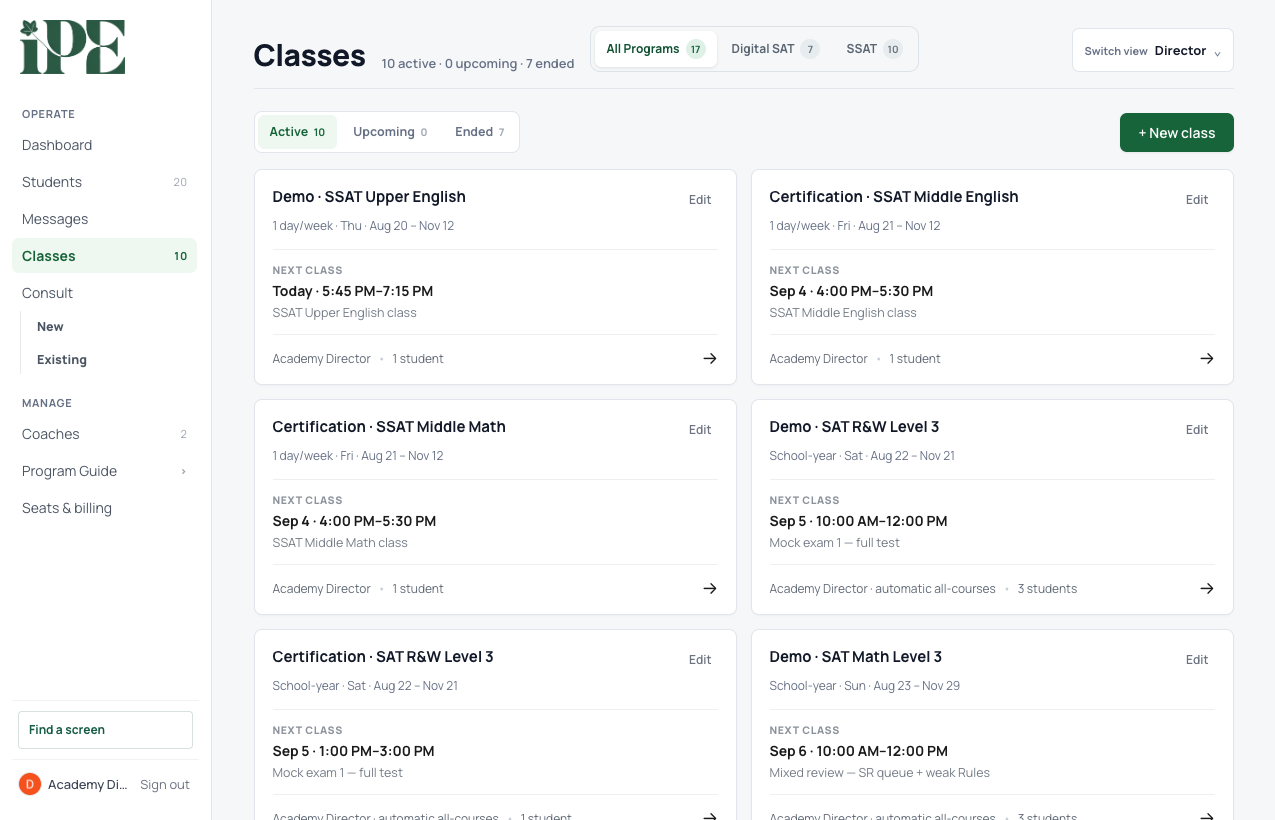
CURRENT DIRECTOR CONSOLE · DEMO DATACLASS OPERATIONS
Current IPE director Classes screen showing active SAT and SSAT classes, schedules, rosters, and instructor access using demo records
Class operations remain separate from the student progress viewDirectors can check schedules, rosters, instructors, and class status without opening a student record

Nine books, connected to the same program

The printed materials and digital lessons use the same subject structure and named methods. Select a cover to inspect three real pages.

From walkthrough to first class

Exact timing and commercial terms are confirmed with each academy. The operating sequence is straightforward.

  1. 1
    Program walkthrough

    Review the curriculum, teacher workflow, student experience, reporting, and fit for your academy.

  2. 2
    Agreement and setup

    Confirm the programs, authorized staff, academy identity, and launch plan.

  3. 3
    Teacher onboarding

    Train on the lesson sequence, Rules, assignments, tests, and console workflow.

  4. 4
    First class

    Enroll students, assign the starting work, and begin with the same materials in class and online.

See the complete program in 30 minutes

We will show the current student, teacher, director, and parent views together with the books and course sequence.

  • No academy account is created by this inquiry.
  • We reply to arrange a walkthrough, not to enroll students automatically.
Programs of interest

Book a 30-minute walkthrough

Book preview